
Roblox has a massive worldwide community, with millions of players enjoying its huge collection of games. Across these experiences, players can purchase or earn different in-game items, such as powerful characters, abilities, weapons, and other useful resources to progress faster. However, many players look for codes that can provide free rewards and help them avoid spending extra time or resources. If you’re a Roblox player searching for the latest codes for your favorite game, this guide will help you find and redeem them easily.
Working Free Roblox Promo Codes
At the time of writing, there are no active codes that give free Robux directly. Since Roblox promo codes can change or expire at any time, bookmark this page and check back for the latest updates.
Below, you’ll find the current Roblox promo codes that can unlock exclusive rewards, including avatar items, accessories, pets, bundles, and other fun in-game goodies.
Active General Promo Codes
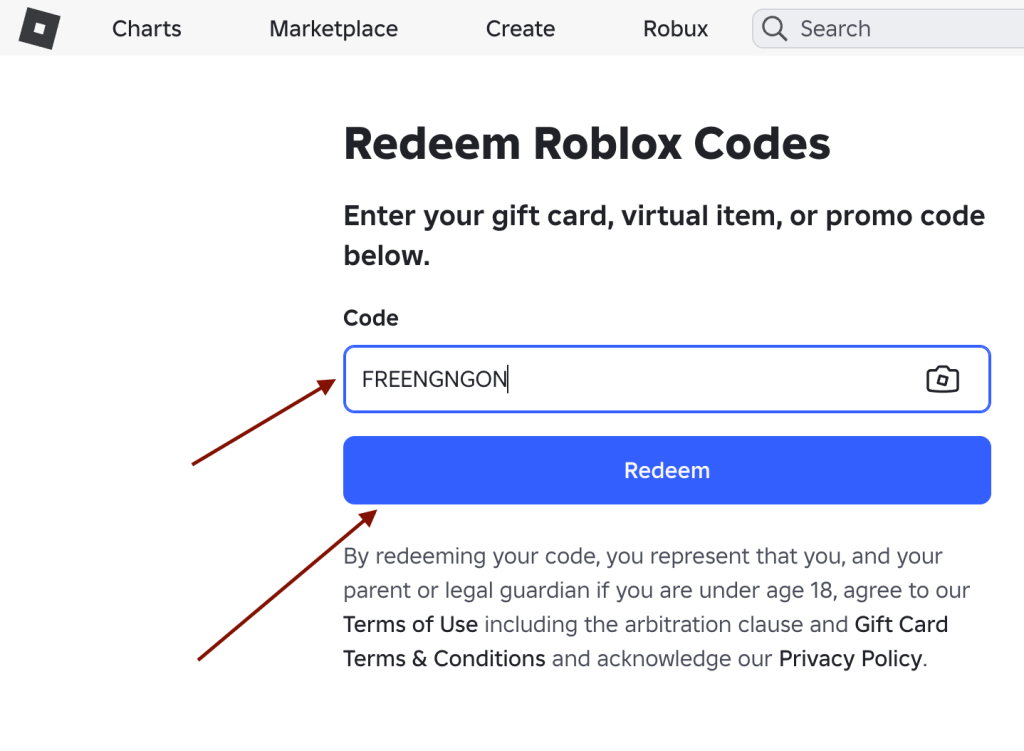
- FREENGNGON — Redeem for Nguyen Gon Bundle (NEW)
- FREENGNBOI — Redeem for Nguyen Boi Bundle (NEW)
- SPIDERCOLA — Redeem for Spider Cola shoulder pet
How to Redeem Roblox Promo Codes (In-game Codes)
Different Roblox games, available, we listed the some game codes that you can use and redeem in game items insantly,
1. Blox Fruits Codes
- KITT_RESET — Stat Reset
- SUB2GAMERROBOT_RESET1 — Stat Reset
- SUB2UNCLEKIZARU — Stat Refund
- BIGNEWS — In-Game Title
How to Redeem In-Game Codes?
- Open Blox Fruits on Roblox.
- Click the Gift/Present icon on the left.
- Enter a working code in the code box.
- Click Redeem to claim your reward.
2. Anime Vanguards Codes
- Miniupdate1 — Trait Rerolls and Memoria Shards
- 2BVisits — Trait Rerolls and Memoria Shards
- Prepare — Red Key
How to Redeem In-Game Codes?
- Launch Anime Vanguards.
- Open your Profile from the right side.
- Select Codes.Enter the code.
- Click Redeem Code.
3. Anime Defenders Codes
- update — Free rewards
- sorry4delay — Free rewards
- thanks — Free rewards
How to Redeem In-Game Codes?
- Open Anime Defenders.
- Reach Level 8.
- Open the menu in the top-left.
- Select Codes.Enter the code and click Redeem.
4. Fruit Battlegrounds Codes
- BIGMILLI — Free Gems
- MILLI90SWAG — Free Gems
- PERFORMANCE — Free Gems
How to Redeem In-Game Codes?
- Launch Fruit Battlegrounds.
- Click Spin in the main menu.
- Select Spin again to open the code box.
- Enter your code.
- Click Redeem to receive your Gems.
5. Mansion of Wonder Codes
- BOARDWALK — Ring of Flames
- GLIMMER — Head Slime Hat
- THINGSGOBOOM — Ghastly Aura
- PARTICLEWIZARD — Tomes of the Magnus
- FXARTIST — Artist Backpack
How to Redeem In-Game Codes?
- Open Mansion of Wonder on Roblox.
- Find the Swag Booth.
- Select Redeem Code.
- Enter your code and confirm.
- Your reward will be added to your account.
6. Anime Fighters Simulator Codes
- NEWYEAR — Free rewards
- 1MILLION — Free rewards
- UPDATE — Free rewards
How to Redeem In-Game Codes?
- Open Anime Fighters Simulator.
- Click the Twitter icon on the left.
- Enter your code in the box.
- Click the green button to redeem it.
- Your rewards will be added automatically.
7. Island of Move Codes
- DIY — Kinetic Staff
- VICTORYLAP — Cardio Cans Hat
- SETTINGTHESTAGE — Build It Backpack
- GETMOVING — Speedy Shades
- STRIKEAPOSE — Hustle Hat
- WORLDALIVE — Crystalline Companion
How to Redeem In-Game Codes?
- Launch Island of Move.
- Find the PLAY IT! character.
- Choose Redeem Code.
- Enter your code.Confirm to claim the reward.
8. Blade Ball Codes
- FROGS — Free rewards
- DUNGEON — Free rewards
- GOODVSEVIL — Free rewards
How to Redeem In-Game Codes?
- Start Blade Ball on Roblox.
- Click Extra on the left side.Select Codes.
- Enter an active code.
- Click the checkmark to claim your reward.
9. Pet Simulator 99 Codes
- Various event and update codes — Free in-game rewards
How to Redeem In-Game Codes?
- Launch Pet Simulator 99.
- Open the Shop or code redemption menu.
- Enter your active code.
- Confirm the code.
- Collect your rewards.
How to Redeem Roblox Promo Codes
Redeeming Roblox game code as simple as following the steps below.
1)Open Roblox promo codes page.
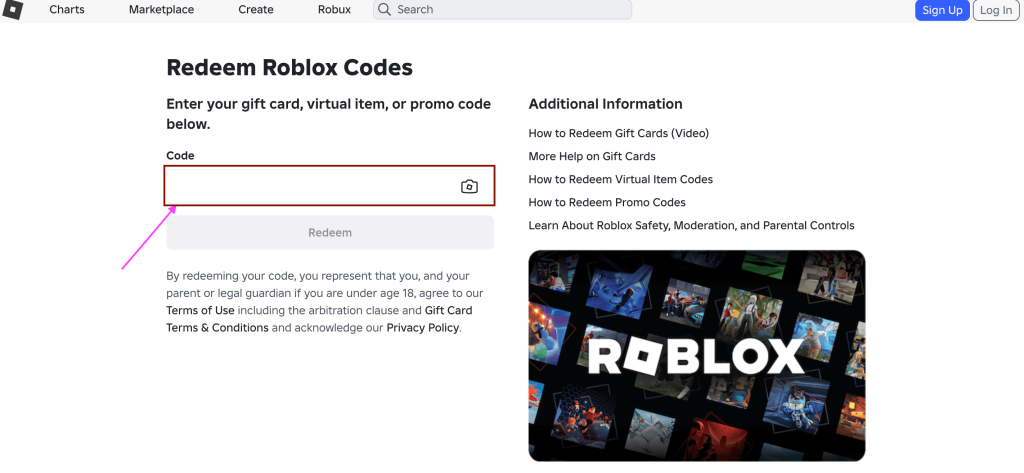
2) Enter the desired code into the empty box and click on Redeem button
How to Get More Codes?
Want to stay updated with the latest Roblox codes? Bookmark this page so you can quickly check for new codes and rewards. We regularly update our code lists whenever new codes are released. You can also join the game’s official Discord server for announcements and updates. Following the game’s social media accounts can help you spot new codes faster. Keep checking back so you don’t miss limited-time rewards.
Why isn’t my Roblox code working?
If a Roblox code isn’t working, it may have expired or been entered incorrectly. Check the following:
- Code expired: Some codes are only available for a limited time.
- Typing error: Copy and paste the code to avoid mistakes.
- Case sensitivity: Enter the code exactly as shown.
- Already redeemed: Most codes can only be used once per account.
- Level requirement: Some games require you